F5 ASM HTTP Protocol Compliance: Content length should be a positive number
Oct 25, 2026Why is F5 ASM blocking a request with a negative Content-Length?
Introduction
The Content-Length header tells the receiving device how many bytes of body to expect after the headers. When a client posts a JSON payload or a form, Content-Length is how the BIG-IP, the web server and the application know exactly where that body ends.
F5 ASM and Advanced WAF have a sub-violation called Content length should be a positive number. As the name says, it checks that the value is a real number, and that it is above zero.
It sounds like a small thing. It isn't, because getting the length of a request wrong is the starting point for some nasty attacks.
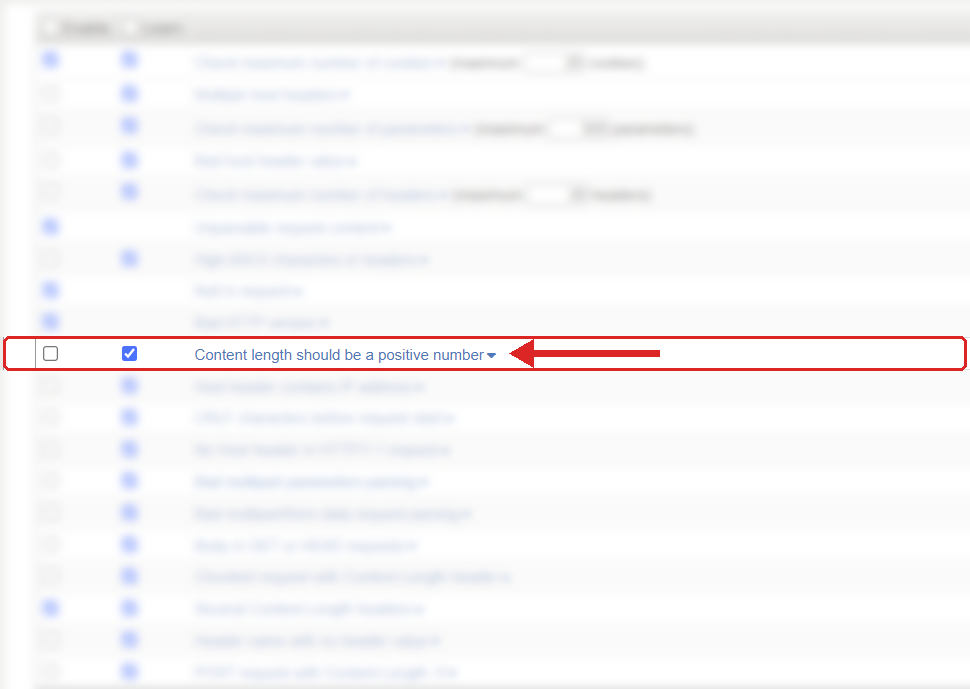
Where to find it: Security › Application Security › Policy Building › Learning and Blocking Settings › HTTP protocol compliance failed. Settings shown are from my lab.
The Problem
A normal request with a body looks like this:
POST /api/orders HTTP/1.1
Host: api.example.com
Content-Type: application/json
Content-Length: 19

{"item":"training"}
The client is saying "nineteen bytes are coming". Simple.
These are the values this check is there to catch:
Content-Length: -1
Content-Length: ten
Content-Length: 12abc
A negative length means nothing. You can't send minus one bytes. And a value that is not a number at all can't be used to work out where the body ends.
Two values that people often expect to see here are actually covered by different sub-violations:
Content-Length: 0
Content-Length:
A zero on a POST is handled by POST request with Content-Length: 0, and an empty value is handled by Header name with no header value. I have separate posts on both of those.
The check is found under Security › Application Security › Policy Building › Learning and Blocking Settings, inside HTTP protocol compliance failed. The sub-violation is enabled or disabled on its own, but blocking is set on the parent group.
How to Recognise It
In the request log you will see HTTP protocol compliance failed, and in the violation details, Content length should be a positive number.
Open the request and look at the exact value after Content-Length:. Then ask where it came from. Normal browsers and mainstream HTTP libraries work the length out for you, they don't get it wrong. When I see a negative or non-numeric value it is nearly always one of these:
- A scanner or attack tool deliberately sending bad lengths to see how the servers behave.
- Custom code where somebody is building the request by hand and setting the header themselves.
- A proxy, gateway or iRule that is rewriting headers and has got the length wrong.
The Risk
This is the important bit. Content-Length is how every device in the path decides where one request ends and the next one starts on the same connection.
If the client sends a value that makes no sense, different devices will deal with it differently. One might reject it, one might ignore the header, one might treat it as zero, one might read a different amount of data. As soon as the front end and the back end disagree about where a request ends, you are in request smuggling territory, where an attacker hides a second request inside the first one and it gets processed without going through the checks it should have.
A negative Content-Length on its own does not prove somebody is smuggling requests. But it is the kind of thing that only appears when somebody is either testing your parsers or something is badly broken, and neither of those is traffic you want reaching the application.
Mitigation
I would recommend leaving this one enabled on every policy. There is no legitimate client that needs to send a negative or text Content-Length, so false positives should be very rare.
When it fires, find the source.
If it is an external scanner or bot, let it block. That is the check doing its job.
If it is something internal, a script, an integration, a monitoring tool or a proxy, fix it at the source. The best fix is usually to stop setting Content-Length by hand and let the HTTP library work it out. If a proxy or iRule is rewriting the body, make sure it also updates the length correctly.
Please don't disable the check, or create a broad exception, because of one internal tool. This is one of the protections that sits between you and request smuggling.
Gotchas and Limitations
Check exactly which sub-violation is in the event before you decide what to do. F5's own description of this check says the value must be greater than zero, so if you do see this one fire on a zero, look at the request carefully and see whether it is really this check, or POST request with Content-Length: 0, before you change anything.
Remember that HTTP itself allows Content-Length: 0. A POST with no body, a logout for example, is perfectly valid HTTP. So do not treat a zero the same way as a minus one.
This check also does not cover the other Content-Length problems. Two Content-Length headers is Several Content-Length headers, and Content-Length together with chunked encoding is Chunked request with Content-Length header. Those two are the more serious smuggling checks and should stay enabled as well.
And it is not a size limit. A huge but positive value passes this check. Request size is controlled elsewhere in the policy.
Takeaway
Content length should be a positive number catches lengths that make no sense, negative values and text where a number should be.
No real client needs to send those. Leave the check enabled, look at the raw header when it fires, and fix whatever is building the request rather than weakening the policy.
Get F5 in Practice by email
One practical F5 insight at a time, written by me from work I've actually done.
Your email stays with me. It is never shared.
No spam. I will never sell your information, for any reason.